How & Why to Connect Threads to the Fediverse—including Mastodon
Fancy (or cringe) name aside, “the fediverse” is a wider network where the people are in control
| 3 min readThis week Threads announced it is rolling out wider support for connecting with “the fediverse,” and it’s a no-brainer to opt in to this feature if you’re on Threads.

What is the fediverse?
The fediverse, sometimes referred to as “the open social web,” is a network of individual social networks that interoperate with one another using open standards. This includes social networks like Mastodon, but also includes news aggregation service Flipboard, individual WordPress sites, video streaming services powered by PeerTube, photo sharing communities using Pixelfed, link-aggregators using Lemmy, among many others.
It’s a tired-but-true comparison to think of it like email: you can use Gmail, I can use Fastmail, and we can all interact with a friend using their company’s self-hosted email service because email is fundamentally interoperable using open standards and protocols. The fediverse is just like that, but for social communities.
If you want to dive in to understand even more, The Verge has a great fediverse explainer—or if you want to hear it from Meta, they’ve written up this fancy release from their perspective.
Why connect to the fediverse?
So as someone who uses Threads, why should you opt into connecting your account to the fediverse? In short, because it’s an easy way to expand your reach! It’s difficult to definitively count the number of users across the entire fediverse due to the network’s decentralized nature, but current estimates show there are around 11 million users on the fediverse, and growing. That’s a lot of people out there!
Even if you’re someone who doesn’t really care about reaching a bunch of people with your posts, think of it this way: connecting to the fediverse makes it so you’re not artificially forcing anyone who wants to keep in touch (or see what you’re up to, or laugh at your shitposts) to use Facebook—since fundamentally, Threads is Instagram is Facebook (and accounts/posts are shared between Meta’s different platforms).
In practice, this means that I can be on my own Mastodon server (with the fancy handle @cassidy@blaede.family) and follow your account, e.g. @YourThreadsUsername@threads.net. Remember that email comparison earlier? You can see how it’s pretty similar! Any of your public posts on Threads will then show up in my social feed alongside posts from people I follow on Mastodon and other sites.
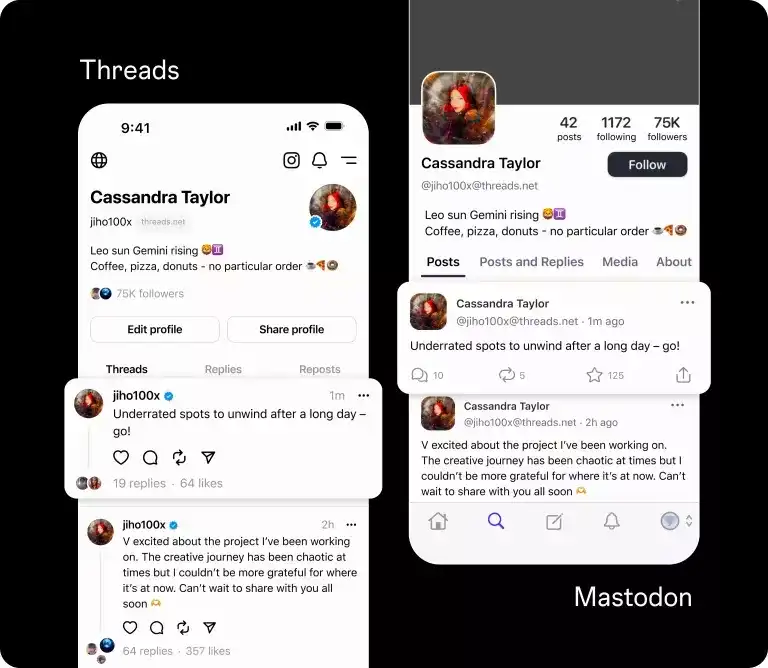
On your side, you’ll see when anyone on the fediverse “likes” or replies to your post, too—all without leaving Threads.

But for now, Meta is making you opt in to this feature since it’s pretty new. If you don’t turn on sharing to the fediverse on your Threads account, nobody will be able to find you outside of Threads itself.
If you want to learn even more, Meta has this fediverse-specific privacy guide for Threads.
How to turn on fediverse sharing
Luckily, turning on fediverse sharing for your Threads account is simple:
- Go to your Account Settings in Threads
- Select “Fediverse sharing”
- Follow the on-screen instructions

That’s it! You’re set up to share across the fediverse so that people like me—and millions of others—can follow you from our preferred social networks. Plus, you can always turn it back off later if you want from the same place if you change your mind!
Images via Meta newsroom